Minecraftle
Craft your way to the answer, Minecraft-style.
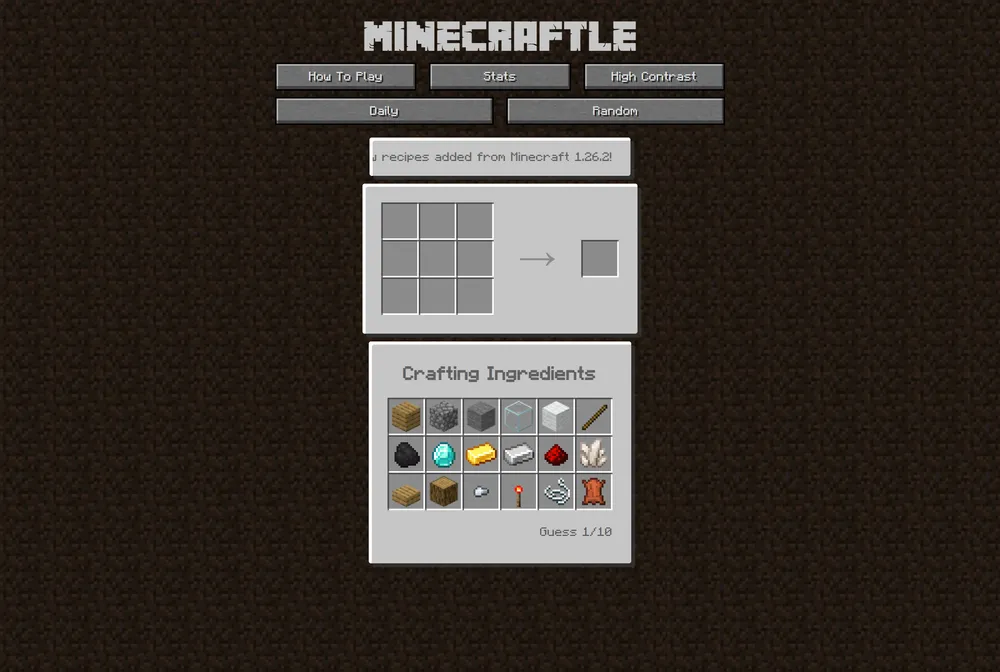
Minecraftle is a daily puzzle that turns Minecraft's crafting table into a Wordle-style guessing game. Each day there is one secret recipe, and you have ten guesses to rebuild it by arranging ingredients on a 3x3 grid. After every submission, each square is colored to tell you which materials belong and whether they are in the right place.
What is Minecraftle?
Minecraftle is a daily browser puzzle that swaps Wordle's row of letters for a Minecraft crafting table. Every day there is one hidden recipe, and your job is to rebuild it on a 3x3 grid using a limited set of ingredients before you run out of guesses. Instead of typing words, you arrange materials in cells the way you would at an in-game crafting bench, then submit the layout and read the colors that come back. Because the answer is always a real craftable item, the puzzle rewards anyone who already carries Minecraft recipes around in their head.
The feedback works square by square across all nine cells. A green square means the ingredient is correct and sitting in exactly the right spot, an orange square means that ingredient does belong in the recipe but you placed it in the wrong cell, and a grey square means that material is not part of the answer at all. This per-cell signal is what sets Minecraftle apart from text-based daily games: you are solving two problems at once, which ingredients are involved and how they are positioned relative to one another. A shape that is almost right but shifted one row over will light up orange, nudging you to slide pieces around rather than start from scratch.
Minecraftle was built in 2022 by Zach Manson, Harrison Oates, Tamura Boog, and Ivan Sossa as a project for an agile web development university unit, where it earned top marks. Zach Manson now hosts and maintains the version at minecraftle.zachmanson.com, which has been rebuilt with Next.js and React, and the project remains open source on GitHub with additional contributors credited there. The hosted game pulls from current Minecraft crafting data, so the pool of possible answers stays aligned with what the game actually lets you craft. Beyond the once-a-day puzzle, the site includes a Random mode that serves up unlimited recipes for practice whenever the daily one is finished.
When you complete a puzzle, Minecraftle generates a spoiler-free emoji grid you can copy and share to show how you did, displaying the pattern of squares without revealing the recipe itself, and a stats page tracks your results over time. The overall vibe is relaxed but genuinely tricky: ten guesses sounds generous until you realize a recipe can hide its ingredients in unusual positions, and obscure items can stump even seasoned players. It suits Minecraft fans who enjoy a short, self-contained daily brain teaser, and it is forgiving enough that newcomers can learn recipes by playing while veterans race to solve in as few attempts as possible.
How to play Minecraftle
- Open the daily Minecraftle puzzle and look over the ingredients shown in your inventory, since the secret recipe uses only items from that set.
- Click or tap an ingredient, then place it into a cell of the 3x3 crafting grid to start building your guessed layout.
- Fill in the cells you want to test and submit the layout as one full guess against the hidden recipe.
- Read the per-square colors: green is the right ingredient in the right cell, orange is a needed ingredient in the wrong cell, and grey means that ingredient is not in the recipe.
- Use that feedback to move orange ingredients to new cells, drop grey ones, and keep your greens locked, then submit your next guess.
- Keep refining for up to ten guesses until every square turns green, which means you have rebuilt the day's secret recipe.
Tips and strategy
- Start by thinking in real Minecraft recipes, because the answer is always a craftable item, so a familiar pattern like a filled 3x3 block or a tool's T-shape is often the quickest path in.
- Treat orange squares as a positioning clue, not a rejection: that ingredient belongs in the recipe, so slide it to a different cell instead of removing it.
- Spend an early guess scouting which materials exist at all, then use the grey results to permanently rule those ingredients out and shrink your options.
- Pay attention to the grid shape itself, since many recipes leave specific cells empty, and confirming an empty cell is just as useful as confirming a filled one.
- Once a square goes green, leave it untouched in later guesses so you can focus your remaining attempts on the unsolved cells.
- If the daily puzzle has you stuck, run a few rounds in Random mode first to warm up on recipe patterns without spending your ten daily guesses.
Good to know
- Resets
- Daily, one new puzzle each day
- Cost
- Free to play in the browser
- Guesses
- 10 per puzzle
- Grid
- 3x3 crafting grid, nine cells to fill
- Modes
- Daily puzzle plus unlimited Random mode
- Creators
- Zach Manson, Harrison Oates, Tamura Boog, and Ivan Sossa (2022); hosted by Zach Manson
Minecraftle FAQ
Is Minecraftle free?
Yes. Minecraftle is free to play in any web browser at minecraftle.zachmanson.com, with no account or purchase required.
How many guesses do you get in Minecraftle?
You get 10 guesses per puzzle. Each guess is a full 3x3 layout, and the color feedback on every square helps you adjust before your next attempt.
Is Minecraftle related to Wordle?
It is inspired by Wordle's daily format and color-coded feedback, but instead of guessing a word you rebuild a hidden Minecraft crafting recipe on a 3x3 grid. Green, orange, and grey squares replace Wordle's letter clues.
Can I play more than one Minecraftle per day?
The daily puzzle is once per day, but the site also has a Random mode that gives you unlimited extra recipes to play whenever you want more practice.
Who made Minecraftle?
It was created in 2022 by Zach Manson, Harrison Oates, Tamura Boog, and Ivan Sossa for a university web development unit. Zach Manson now hosts and maintains the version, and the project is open source on GitHub.