Palwordle
Guess the daily Palworld creature from clues.
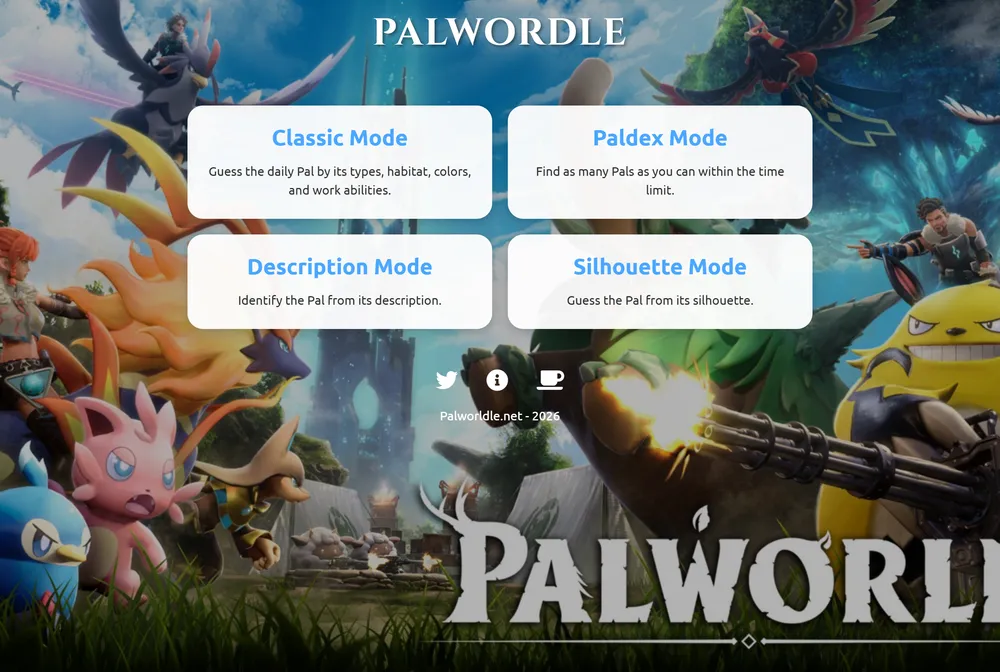
Palwordle is a daily guessing game built around the Pals from the video game Palworld. Each day it picks one hidden Pal, and you try to identify it by typing in other Pal names and reading the clues that come back. It runs entirely in the browser at palwordle.net, with no account or download needed.
What is Palwordle?
The core of Palwordle is its Classic mode. You type in the name of any Pal, and the game lines your guess up against the daily hidden creature across several attribute columns: Type 1, Type 2, whether the Pal is rideable, its habitat, its colors, and its work suitability. Each tile turns green when that attribute is an exact match, yellow when it partially overlaps, and red when there is no overlap at all. You read those colors row by row, narrow down which Pal fits every clue, and keep guessing until you land on the right one.
Palwordle is not a word game. Instead of matching letters, it compares creature attributes, which puts it closer to fan games like Pokedle or Loldle than to the original Wordle. It is dedicated entirely to Palworld's roster, so the whole puzzle rewards knowing your Pals: their elemental types, where they live, what colors they are, and which jobs they are good at. The site also bundles several distinct guessing modes under one roof rather than offering a single format.
Beyond Classic, the site offers a Paldex or Collection mode where you name as many Pals as you can before a timer runs out, a Description mode where you identify a Pal from written text, and a Silhouette mode where you guess from an outline. You can approach the same roster of creatures in different ways, whether you recognize a Pal by its shape, its written description, or its attributes.
Palwordle is a fan-made project with no named creator listed on the site, which uses the @Palwordle handle on social media. Contact and feedback go through an email option and a Ko-fi page, where donations are accepted with a buy me a coffee note. Pocketpair, the studio behind Palworld, does not endorse or sponsor the project. If you get stuck in Classic mode, extra hints unlock after a set number of wrong guesses: the Pal's ability first at 6 wrong guesses, then its Paldex description at 10. When you win, a victory screen shows a Next Pal in countdown to the next daily puzzle.
How to play Palwordle
- Open Palwordle at palwordle.net and choose Classic mode.
- Type the name of any Pal into the guess box and submit it.
- Read the attribute tiles: green means an exact match, yellow means a partial match, and red means no overlap.
- Use the Type, habitat, color, and work suitability clues to narrow down which Pal fits every column.
- Keep guessing, and lean on the extra hints that unlock after 6 and then 10 wrong guesses if you get stuck.
- Land on the correct Pal to win, then watch the Next Pal in countdown for the next daily puzzle.
Tips and strategy
- Start with a Pal you know well across many attributes so you get useful color feedback on Type, habitat, and work suitability all at once.
- Pay close attention to yellow tiles, since a partial match tells you the hidden Pal shares that attribute without fully matching your guess.
- Use the two Type columns together: locking down both Type 1 and Type 2 quickly cuts the roster down.
- Treat work suitability as a strong filter, because Pals with a specific job like kindling or watering narrow the field a lot.
- If you are stuck near the limit, spend a few extra guesses to trigger the hints that unlock at 6 and 10 wrong attempts.
- Try the Silhouette and Description modes to sharpen your knowledge of the roster, which pays off back in Classic mode.
Good to know
- Category
- Video game guessing puzzle
- Resets
- Daily, with a Next Pal in countdown
- Cost
- Free, no account or download
- Modes
- Classic, Paldex/Collection, Description, Silhouette
- Feedback
- Green exact, yellow partial, red no overlap; hints at 6 and 10 wrong guesses
- Creator/Publisher
- Anonymous fan project; not endorsed by Pocketpair
- Platform
- Web browser
- Source game
- Palworld
Palwordle FAQ
Is Palwordle free?
Yes. Palwordle runs in the browser and needs no account and no download. Donations are optional through the site's Ko-fi page.
How do you play Palwordle?
In Classic mode you type in a Pal's name and compare your guess to the daily hidden Pal across attributes like Type, habitat, colors, and work suitability. Tiles turn green for an exact match, yellow for a partial match, and red for no overlap, and you keep guessing until you find the right Pal.
When does Palwordle reset?
Every day. The site notes that you guess a different Pal each day, and the victory screen shows a Next Pal in countdown to the next daily puzzle.
Is Palwordle like Wordle?
It borrows the daily guessing structure but is not a word game. Instead of matching letters, it compares creature attributes, which makes it closer to fan games like Pokedle or Loldle than to the original Wordle.
Who made Palwordle?
It is an anonymous fan-made project with no named creator on the site, which uses the @Palwordle handle on social media. Contact is through an email feedback option and a Ko-fi page, and Pocketpair, the developer of Palworld, does not endorse or sponsor it.