AirportQ
Identify the mystery airport from progressive clues.
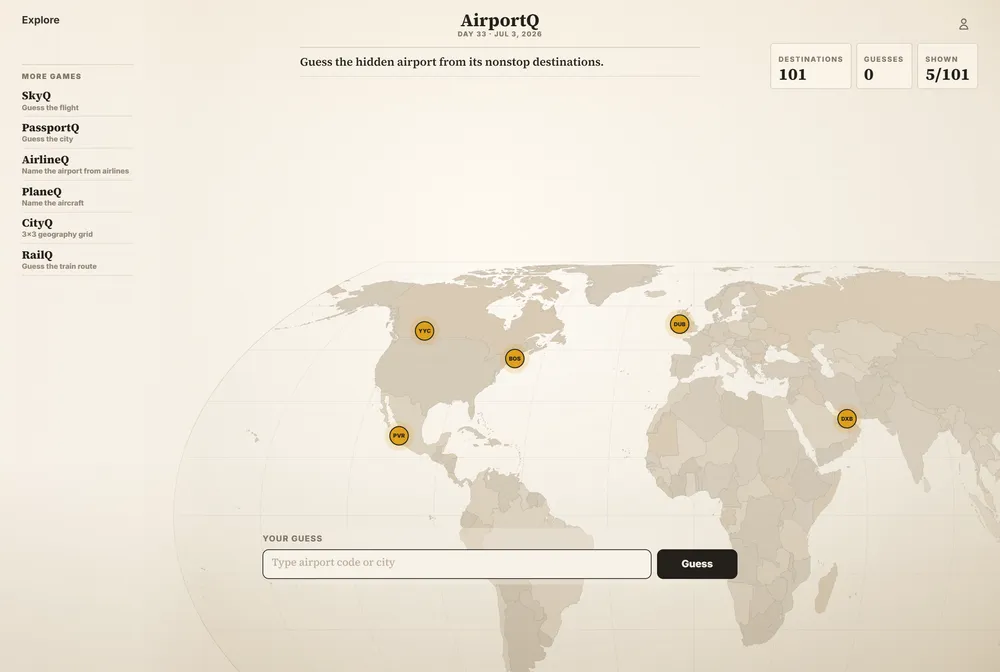
AirportQ hides one real airport each day and shows you nothing but a map of the nonstop destinations it flies to. There is no name, no code, no city label, just a set of destination dots and routes drawn on a world map. You guess the airport by reading the shape of its route network: a dense web of long-haul spokes points to a major hub, while a handful of short regional lines points somewhere smaller.
What is AirportQ?
AirportQ is one of the daily games in the FlightQ family, a network of aviation and geography guessing games that also includes SkyQ, AirlineQ, PassportQ, CityQ, RailQ, and others. Where most of those games ask you to identify a flight, an airline, a city, or a passport stamp, AirportQ is built entirely around one dataset: which cities a given airport serves nonstop. That single piece of information, drawn as a route map, is both the puzzle and the only clue you start with. The game's own instructions tell you to study the destination map and look for the regions, coastlines, and long-haul routes connected to the hidden airport. The core loop is simple. You look at the map of destination dots, then type a guess, which can be a city name, an airport name, an IATA code, or an ICAO code. If you are wrong, the map does not turn letters green or gray the way a word game would. Instead it reveals more of the answer's own route network, adding destinations you did not have before. Each miss is a hint baked directly into the puzzle's own data rather than a generic right or wrong marker, so guessing wrong still moves you closer to the answer. What sets AirportQ apart from most -dle style games is that it has no letter grid at all. There is nothing to spell and nothing to color-code. The entire feedback system is the progressive reveal of a real airport's actual flight map, which means the game doubles as a piece of trivia about global air routes: which cities are connected to which, and how the density of that connection pattern gives away whether you are looking at a small regional field or a major international hub. There is no stated limit on the number of guesses, so you can keep guessing and unlocking more of the map until you either name the airport correctly or the full destination network is revealed. The game is free to play and does not require an account, with an optional paid tier that removes ads rather than unlocking extra content. It resets once a day with a new hidden airport, and the site keeps a browsable archive of past days so you can go back and try airports you missed. FlightQ is credited as the publisher across the whole game family, but the site does not name an individual person or studio behind the FlightQ brand, and it does not give an exact date when AirportQ itself launched.
How to play AirportQ
- Open AirportQ at flightq.app/airportq.
- Study the map shown for the day, which marks every nonstop destination the hidden airport flies to.
- Type a guess as a city name, airport name, IATA code, or ICAO code.
- If your guess is wrong, look at the additional destinations the map reveals and use them to narrow down the airport.
- Keep guessing and letting the map fill in until you identify the airport or the full route network is shown.
- Come back the next day for a new hidden airport, or check the archive for past puzzles you missed.
Tips and strategy
- Count the destinations first. A map with only a few short regional lines suggests a smaller airport, not a global hub.
- Look at the geographic spread. Routes clustered in one region point to a regional or domestic-focused airport, while destinations spread across continents point to a major international hub.
- Notice route length. A mix of very long overseas routes alongside short domestic hops is a strong hint the airport is a large carrier's hub.
- Use each wrong guess deliberately. Since a miss reveals more of the map rather than just telling you that you are wrong, treat early guesses as a way to unlock more data, not just as attempts to get it right.
- If you recognize a distinctive combination of destination cities, that combination is often unique enough to identify the airport before the full map is revealed.
- Try IATA codes for your guess if you are confident but unsure of the exact spelling of a city or airport name, since codes are shorter and less ambiguous to type.
Good to know
- Category
- Geography / aviation
- Resets
- Daily, with a new hidden airport each day
- Cost
- Free to play, no account required (optional paid tier removes ads)
- Guesses
- Unlimited
- Modes
- Single daily puzzle
- Archive
- Yes, past daily answers are browsable by date
- Creator/Publisher
- FlightQ
- Feedback
- Progressive reveal of more destinations on the route map after each wrong guess
AirportQ FAQ
Is AirportQ free to play?
Yes. AirportQ does not require an account to play, and the only paid option is a premium tier that removes ads rather than adding content.
How do you play AirportQ?
You are shown a map of one hidden airport's nonstop destinations and you guess the airport by typing a city name, airport name, IATA code, or ICAO code. Wrong guesses reveal more destinations on the map instead of marking letters right or wrong.
When does AirportQ reset, and is there an archive?
AirportQ resets once a day with a new hidden airport. The site also keeps an archive of past daily puzzles, browsable by date, so you can try ones you missed.
Is AirportQ like Wordle?
Only in that it is a free daily puzzle with one answer per day. It does not use a letter grid or color-coded feedback. Instead, wrong guesses progressively reveal more of the hidden airport's actual route map.
Who made AirportQ?
AirportQ is published by FlightQ, which runs a network of related daily aviation and geography games including SkyQ, AirlineQ, PassportQ, CityQ, and RailQ. The site does not name an individual creator or company behind the brand.